Tweet the information in this post.
1. Excel sheets
2. Google sheets
1. Excel sheets
Now that I know how to do this I can't believe the time I've spent repeating the process individually, searching within each tab. Shameful.
Thanks to
@Richard_Black and
@marklardner for explaining this.
When you've got your spreadsheet open and want to look for the existence of a search-string (I was looking for Computer Science or Computing, so used
comput as that would find both) do something a bit like the following.
PC users - Ctrl+F brings up the Find menu
Mac users - Command+F brings up the Find menu
1. Ctrl+F or Command+F to bring up the Find menu
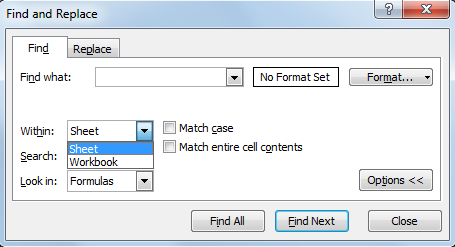
It looks like this on my version
2. Click on the Options button and it will look like this- where it says 'Within: Sheet' (the default setting), change this to Workbook. Then you can bounce through the tabs pressing enter (identical to clicking 'Find Next') as you go.
2. Google sheets
Not that different, see picture series below.
Wait for the sheet to load, if you don't and press Ctrl+F you're searching 'in browser' and you want to be searching 'in sheet(s)' so have patience.
Once loaded press Ctrl+F and you'll see a dialog box [
1] appear near the top right of your page (if you see one appear bottom left of your browser window [
1a] refresh the page and wait patiently, that's the wrong one). Click on the three vertical dots to bring up the options and choose from the options.
Type in your word or phrase of interest and select the 'This sheet' option [
2], to adjust it...
...to 'All sheets' [
3] so that you search across the whole document, not just the current tab. Once you've entered a search term the 'Find' link will become active, keep clicking it to bounce through the results.
When it's found everything it can look out for this notice, in [
4].
Edit: 30 July 2017
Someone from Portugal was super keen for me to tell you about VLOOKUP. I've no idea what it is (no need either so please don't tell me) but
here is Microsoft's own page about it - they wrote the software so I assume they know what they're talking about.







 Posts
Posts

