Stuff that occurs to me

All of my 'how to' posts are tagged here. The most popular posts are about blocking and private accounts on Twitter, also the science communication jobs list. None of the science or medical information I might post to this blog should be taken as medical advice (I'm not medically trained).

Think of this blog as a sort of nursery for my half-baked ideas hence 'stuff that occurs to me'.

Contact: @JoBrodie Email: jo DOT brodie AT gmail DOT com

Science in London: The 2018/19 scientific society talks in London blog post

Showing posts with label spreadsheets. Show all posts

Tuesday, 14 October 2014

How to turn two columns in Excel into one without losing contents - concatenate not merge

To be honest I'd assumed the Merge function would sort that out, but no, it creates a single cell from two cells but deletes the content of one and so leaves you with half of your information. Merge is not the function you're looking for.

It turns out that it's Concatenate.

Here's a picture of what I had and what I wanted.


Obviously my first port of call was Twitter.


I used the second suggestion and it worked, hooray.


Wednesday, 27 August 2014

Home-made Pomodoro timings - a spreadsheet with hard sums pre-calculated :)

I've read positive and negative things about the Pomodoro technique (basically using a timer to restrict the time in which you work / break / work in the hope of reducing distraction and getting more stuff done in a shorter time-frame). I don't suffer from procrastination particularly (no more than the usual) but I do often find that (a) I think of something unrelated to the task and think 'well I'd better do that now' and / or (b) find that in order to do something I first need to do something else that is related to the task.

While I can't think of anything that will help with (b) I use Workflowy.com for (a) and just enter a one-line reminder and then forget about it until I next have a break / bit of time to deal with it. What I've found with Pomodoro is that it removes me from the equation. I am the rate-limiting step in getting stuff done because other stuff pops into my head, but a combination of 'dump it here and forget about it for now' and 'get on with what I started' seems to be productive. Of course I may acclimatise and will have to add in 5 minute beatings to motivate myself ;)

It's easy to do, just start a timer for 25 mins, do something useful. Stop for 5 mins, do it again and so on with longer breaks in between 'sets' of Pomodoros. (Why aren't they called timeatos?)

But I wanted to see how a day would look if it were full of Pomodoros (I'd never do as many as listed but did a big calculation just in case). One of my afternoon tasks today (that I gave myself when I'd finished other stuff, which I did woohoo), was to create a shareable Excel spreadsheet with the timings I'd worked out this morning.

Here it is, instructions are appended below but also embedded in the first tab of the sheet.

Jo's Pomodoro pre-calculated time wrangling spreadsheet:
[View online] [Download Excel .xlsx file]  

and here's a better one from Alan Hennness, my new mortal enemy ;)
[View online] [Download Excel .xlsx file]

Hope you find it useful. Tough luck if you don't (no need to tell me, it works fine for me and that is its primary* purpose) ;)

*sole, but I'm being polite.


Basic instructions
Go to tab marked 'Pomodoro calculations'. Leave the 9am example (the one on the left) and use the one on the right - enter your preferred start time and press enter. The table should populate itself with the suggested timings.

Obviously you still need to use some sort of timer device, but I made this for myself so that I could see how a day might look. Feel free to ignore it entirely :)

Ones in green are timings you may wish to change as these are the breaks. You can amend the calculation in Cells L10, L18 or L26 and the remaining calculations should update accordingly.

Use the guide in columns J and K to amend any timings - this is based on the fact that there are 288 x 5 minutes in 24 hours.

The formula for adding 25 minutes to the time in a cell (where the cell is C3) is
=SUM(C3+5/288)

The formula for adding 5 minutes to Cell C3 is
=SUM(C3+1/288)

If nothing else, and let alone whether or not Pomodoro is of any use, I'm delighted to have learned how to wrangle time formatting in Excel. 

The locked spare is in case anyone mucks up the first sheet - the password is jobrodie
 
Since I made this for me, and it seems to work, I imagine that's the end of it but if you need to contact me I'm on jo.brodie@gmail.com but I'm afraid I'm not going to be doing any more calculations. I'm certain there's a better way of doing this sort of thing but since I've found a solution to how to do this my interest in it has dropped back to zero ;)

Happy productivity, or time-wrangling,
Jo

This page was what pointed out to me the 5/288 style of calculation for 25 minutes:
http://www.excelforum.com/excel-general/750598-solved-adding-half-an-hour-to-a-time-value.html


Tuesday, 12 November 2013

How to search across all tabs in an Excel workbook spreadsheet


Tweet the information in this post.


1. Excel sheets
2. Google sheets

1. Excel sheets
Now that I know how to do this I can't believe the time I've spent repeating the process individually, searching within each tab. Shameful.

Thanks to @Richard_Black and @marklardner for explaining this.

When you've got your spreadsheet open and want to look for the existence of a search-string (I was looking for Computer Science or Computing, so used comput as that would find both) do something a bit like the following.

PC users - Ctrl+F brings up the Find menu
Mac users - Command+F brings up the Find menu

1. Ctrl+F or Command+F to bring up the Find menu
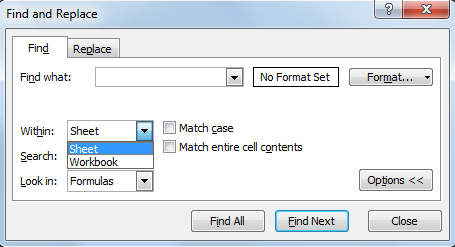
It looks like this on my version


2. Click on the Options button and it will look like this- where it says 'Within: Sheet' (the default setting), change this to Workbook. Then you can bounce through the tabs pressing enter (identical to clicking 'Find Next') as you go.


2. Google sheets
Not that different, see picture series below.

Wait for the sheet to load, if you don't and press Ctrl+F you're searching 'in browser' and you want to be searching 'in sheet(s)' so have patience.

Once loaded press Ctrl+F and you'll see a dialog box [1] appear near the top right of your page (if you see one appear bottom left of your browser window [1a] refresh the page and wait patiently, that's the wrong one). Click on the three vertical dots to bring up the options and choose from the options.

 Type in your word or phrase of interest and select the 'This sheet' option [2], to adjust it...
 ...to 'All sheets' [3] so that you search across the whole document, not just the current tab. Once you've entered a search term the 'Find' link will become active, keep clicking it to bounce through the results.
 When it's found everything it can look out for this notice, in [4].

Edit: 30 July 2017
Someone from Portugal was super keen for me to tell you about VLOOKUP. I've no idea what it is (no need either so please don't tell me) but here is Microsoft's own page about it - they wrote the software so I assume they know what they're talking about.


Sunday, 11 September 2011

A super magic editable spreadsheet for UK science festivals from @lulucrumble

Last Wednesday I tried to find a list of UK science festivals, couldn't find the list I thought I'd made myself so asked Twitter and moments later @arlloyd pointed me to this one:

http://big.uk.com/festivals which is pretty comprehensive.

A few other people expressed an interest in hearing more about and collaborating on keeping such a list updated (a Twitter-mediated distribution of labour with others contributing updates etc in a crowdsourcing way) and then @lulucrumble mentioned that she had an incomplete table / spreadsheet of some of the bigger UK festivals with deadline dates that she's been working on.

She's sent it to me and given me permission to share it. It's incredible. It's not just a list of some important festivals but she's managed to do something utterly unknown to me which is to add in an equation that will tell you, when you open it, whether or not you're about to miss the deadline. I can make columns add up and that's about it. I am in awe :-)

This also means that Excel knows what day it is today, does anyone else find that a bit unnerving ;)

Get the file
The original file can be downloaded here from my Dropbox account (publicly viewable, not publicly editable) and if anyone wants to play around with a Google Docs editable version, that's here (publicly viewable and editable).

Note that the two files are now different formats (uploading an .xls to Google Docs lets you save it as a Gdocs format which I've done) as well as having different content as soon anyone makes a change to it.

Thanks to the following for their input @JamieBGall, @endless_psych, @jimbobthomas, @amyplatypus, @Dalradian and of course @arlloyd and @lulucrumble